
Remote Window Control API Developer Guide
Service Overview
Remote Window Control is a telematics service that allows users to remotely close or in some cases open vehicle windows through a mobile application.
Service Features
- Focus on remote window close functionality
- Limited window open functionality (ventilation mode)
- Anti-pinch safety functionality
- Real-time safety monitoring
- Compliance with regional regulations and OEM policies
Legal Requirements
- Compliance with vehicle window control related safety regulations
- Mandatory application of Anti-pinch safety functionality
- Compliance with personal information protection laws
- Reflection of regional regulation differences
Key Scenarios
Scenario 1: Remote Window Lock Request and Execution
API Flow by Entity:
📱 App (User):
- Window Lock: Request remote window lock control
- Command Reception: Receive 202 Accepted response
- Push Notification: Receive window lock result push notification
- UI Update: Display control results on screen
🚗 Vehicle (TCU):
- Command Reception: Receive window lock command from ECARUS
- Safety Verification: Check engine status, hardware override detection
- BCM Control: Transmit window lock signal to BCM
- Result Publication: Publish success/failure results to ECARUS
🏢 Call Center:
- Proxy Lock: Lock window on behalf of customer
- Status Check: Check window lock status
- Result Reception: Receive window lock results
Scenario 2: Window Lock Release and Status Monitoring
API Flow by Entity:
📱 App (User):
- Window Lock Release: Request remote window lock release control
- Command Reception: Receive 202 Accepted response
- Push Notification: Receive window lock release result push notification
- Status Query: Check window lock status
🚗 Vehicle (TCU):
- Command Reception: Receive window lock release command
- BCM Control: Transmit window lock release signal to BCM
- Status Transmission: Transmit lock release status to server
- Event Publication: Publish status change events
🏢 Call Center:
- Proxy Release: Release window lock on behalf of customer
- Status Monitoring: Real-time window lock status check
- History Query: Query window control history
Scenario 3: Window Settings Management and Diagnostics
API Flow by Entity:
📱 App (User):
- Settings Query: Query window settings
- Settings Update: Update window settings
- Specification Query: Query window specifications
- Diagnostics Query: Query window system diagnostics
🚗 Vehicle (TCU):
- Settings Application: Automatic application of window settings
- Specification Report: Report window specification information to server
- Diagnostics Execution: Diagnose window related component status
- Status Report: Report current window status
🏢 Call Center:
- Settings Management: Manage customer settings and Update window settings
- Specification Management: Automatic window specification management
- Diagnostics Management: Automatic system diagnostics management
- History Management: Automatic control history management
Scenario 4: Window Control Failure and Exception Handling
API Flow by Entity:
📱 App (User):
- Command Request: Window lock/release command request
- Failure Notification: Receive failure reasons via push notification
- Status Check: Check current window status
- Command Cancellation: Cancel executing command
🚗 Vehicle (TCU):
- Safety Verification: Check engine status, hardware override detection
- Failure Processing: Process failure when safety conditions violated
- Result Publication: Publish failure results and error codes
- Status Report: Report current window status
🏢 Call Center:
- History Query: Query failure history
- Diagnostics Check: Check system diagnostics
- Customer Support: Analyze failure causes and guide customers
Key Features
📱 Features to Implement in App
1. Remote Window Control Function
- Window Lock: Request remote window lock control
- Window Lock Release: Request remote window lock release control
- Command Cancellation: Request cancellation of executing command
- Status Query: Immediate window lock status query
2. Settings Management Function
- Settings Query: Query window settings
- Settings Update: Update window settings
- Specification Query: Query window specifications
3. Real-time Status Monitoring Function
- Real-time Updates: Real-time status monitoring via SSE stream
- Event Processing: Real-time processing of window status change events
- Status Display: Real-time display of window lock/release status
4. Notification and UI Functions
- Push Notifications: Receive window control result push notifications
- Error Guidance: User-friendly error messages on failure
- Status Visualization: Visual representation of window status
🏢 Features to Implement in Call Center
1. Proxy Window Control Function
- Proxy Lock: Lock window on behalf of customer
- Proxy Release: Release window lock on behalf of customer
- Command Cancellation: Process command cancellation
- Status Check: Check window lock status
2. History and Diagnostics Management Function
- History Query: Query window control history
- Diagnostics Query: Query window system diagnostics
- Specification Query: Query window specifications
- Statistics Generation: Generate window control usage statistics
3. Settings Management Function
- Settings Query: Check customer window settings
- Settings Update: Support customer setting changes
- Settings Synchronization: Automatic settings synchronization with vehicle
4. Customer Support Function
- Problem Solving: Analyze window control failure causes
- Settings Support: Support customer window settings
- Security Monitoring: Monitor abnormal access patterns
🚗 Functions Processed by Vehicle (TCU)
1. Window Control Function
- Command Reception: Receive window control commands
- Safety Verification: Check engine status, hardware override detection
- BCM Control: Transmit window lock/release signals to BCM
- Result Publication: Publish control results
2. Status Management Function
- Status Collection: Real-time collection of window status data
- Event Publication: Publish status change events
- Status Report: Report current window status
3. Safety Function
- Hardware Override Detection: Detect physical switch priority
- Anti-pinch: Automatic stop when pinch detected
- Engine Status Check: Check engine/ACC status
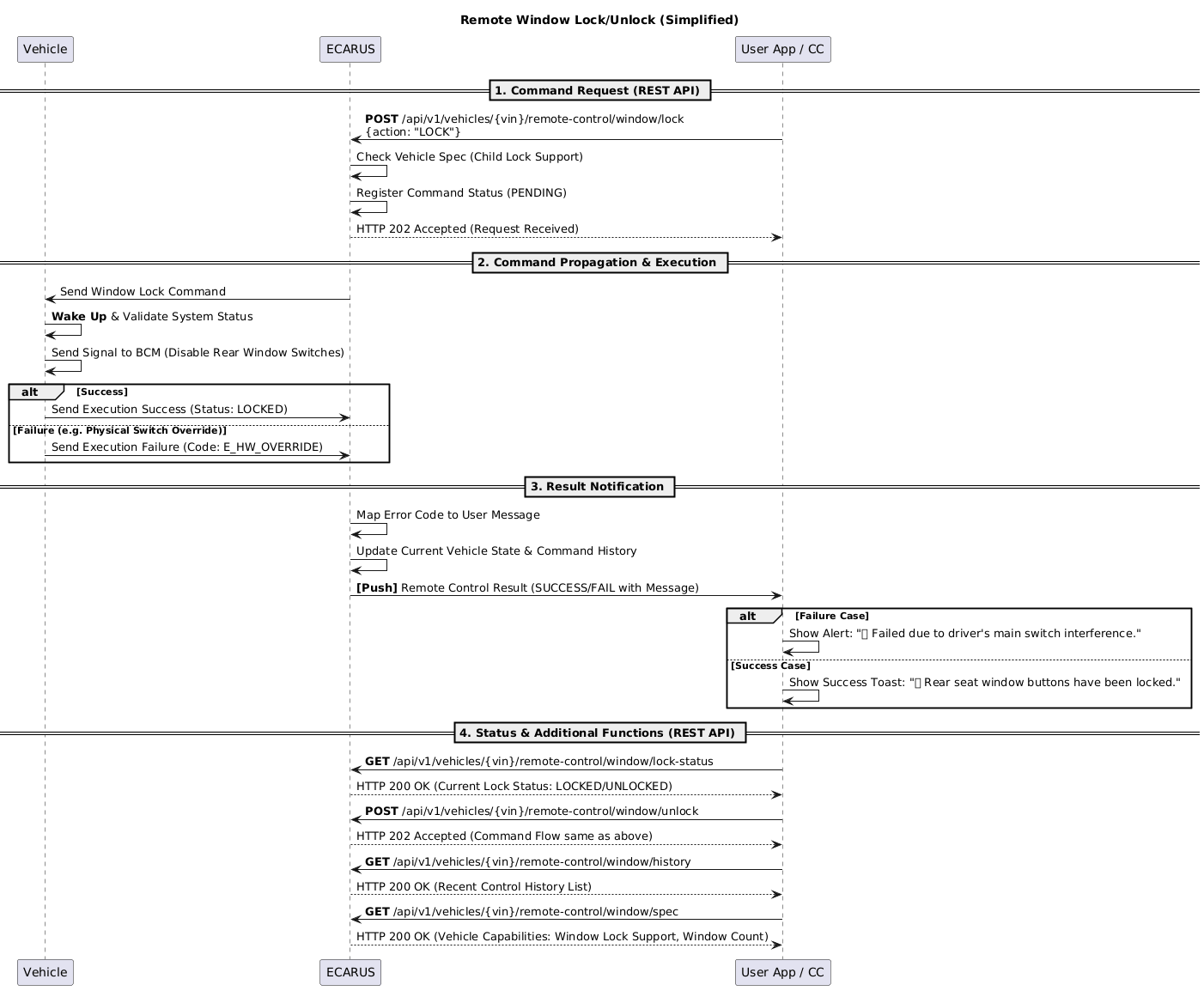
Sequence Diagram
Remote Window Control System Flow
API Endpoints
Refer to the Common API Specifications for headers, response codes, and error formats.
Window Lock
curl -X POST "https://api.ecarus.run/api/v1/remotecontrol/vehicles/KMHSH81C7LU123456/window/lock" \
     -H "Authorization: Bearer sk_4f9c7b8e2d1a6c0f3e7a9b5d8c1e4f2a7c6d9e0b3f5a8c1d4e7f9b2c6a1e3d" \
     -H "Content-Type: application/json" \
-d '{"action": "LOCK", "target": "REAR_WINDOWS"}'Window Lock Release
curl -X POST "https://api.ecarus.run/api/v1/remotecontrol/vehicles/KMHSH81C7LU123456/window/unlock" \
     -H "Authorization: Bearer sk_4f9c7b8e2d1a6c0f3e7a9b5d8c1e4f2a7c6d9e0b3f5a8c1d4e7f9b2c6a1e3d" \
     -H "Content-Type: application/json" \
-d '{"action": "UNLOCK", "target": "REAR_WINDOWS"}'Window Lock Status Query
curl -X GET "https://api.ecarus.run/api/v1/remotecontrol/vehicles/KMHSH81C7LU123456/window/lock-status" \
-H "Authorization: Bearer sk_4f9c7b8e2d1a6c0f3e7a9b5d8c1e4f2a7c6d9e0b3f5a8c1d4e7f9b2c6a1e3d"Window Control Cancellation
curl -X POST "https://api.ecarus.run/api/v1/remotecontrol/vehicles/KMHSH81C7LU123456/window/cancel" \
     -H "Authorization: Bearer sk_4f9c7b8e2d1a6c0f3e7a9b5d8c1e4f2a7c6d9e0b3f5a8c1d4e7f9b2c6a1e3d" \
     -H "Content-Type: application/json" \
-d '{"correlationId": "uuid-12345678", "reason": "User cancellation", "force": false}'Window Control History Query
curl -X GET "https://api.ecarus.run/api/v1/remotecontrol/vehicles/KMHSH81C7LU123456/window/history?period=24h&limit=50" \
-H "Authorization: Bearer sk_4f9c7b8e2d1a6c0f3e7a9b5d8c1e4f2a7c6d9e0b3f5a8c1d4e7f9b2c6a1e3d"Window Specification Query
curl -X GET "https://api.ecarus.run/api/v1/remotecontrol/vehicles/KMHSH81C7LU123456/window/spec" \
-H "Authorization: Bearer sk_4f9c7b8e2d1a6c0f3e7a9b5d8c1e4f2a7c6d9e0b3f5a8c1d4e7f9b2c6a1e3d"Window Control Settings Query
curl -X GET "https://api.ecarus.run/api/v1/remotecontrol/vehicles/KMHSH81C7LU123456/window/config" \
-H "Authorization: Bearer sk_4f9c7b8e2d1a6c0f3e7a9b5d8c1e4f2a7c6d9e0b3f5a8c1d4e7f9b2c6a1e3d"Window Control Settings Update
curl -X PUT "https://api.ecarus.run/api/v1/remotecontrol/vehicles/KMHSH81C7LU123456/window/config" \
     -H "Authorization: Bearer sk_4f9c7b8e2d1a6c0f3e7a9b5d8c1e4f2a7c6d9e0b3f5a8c1d4e7f9b2c6a1e3d" \
     -H "Content-Type: application/json" \
-d '{"window": {"remoteControlEnabled": true, "childLockDefault": true, "autoLockEnabled": false, "individualControl": false}, "safety": {"hardwareOverrideDetection": true, "mainSwitchPriority": true, "interferenceTimeout": 3.0}}'Window Control Diagnostics Information Query
curl -X GET "https://api.ecarus.run/api/v1/remotecontrol/vehicles/KMHSH81C7LU123456/window/diagnostics" \
-H "Authorization: Bearer sk_4f9c7b8e2d1a6c0f3e7a9b5d8c1e4f2a7c6d9e0b3f5a8c1d4e7f9b2c6a1e3d"Window Control Real-time Update Stream (SSE)
Note: Recommended to access via browser or use a dedicated SSE client
curl -X GET "https://api.ecarus.run/api/v1/remotecontrol/vehicles/KMHSH81C7LU123456/window/updates/stream" \
     -H "Authorization: Bearer sk_4f9c7b8e2d1a6c0f3e7a9b5d8c1e4f2a7c6d9e0b3f5a8c1d4e7f9b2c6a1e3d" \
-H "Accept: text/event-stream"Data Models
Window Control Request
{
  "action": "LOCK",
  "target": "REAR_WINDOWS"
}action: OPEN, CLOSE, LOCK, UNLOCK, STOP
target: FRONT_LEFT, FRONT_RIGHT, REAR_LEFT, REAR_RIGHT, FRONT_WINDOWS, REAR_WINDOWS, ALL_WINDOWS
Window Control Response
{
  "commandId": "cmd-uuid-12345",
  "vin": "KMHSH81C7LU123456",
  "status": "PENDING",
  "message": "Window control command received",
  "estimatedDuration": 8,
  "timestamp": "2026-01-12T14:30:00Z"
}status: PENDING, PROCESSING, SUCCESS, FAILED, CANCELLED
Window Lock Status Response
{
  "vin": "KMHSH81C7LU123456",
  "windows": {
    "frontLeft": {"isLocked": true, "position": 0},
    "frontRight": {"isLocked": true, "position": 0},
    "rearLeft": {"isLocked": false, "position": 25},
    "rearRight": {"isLocked": false, "position": 50}
  },
  "childSafetyLock": {
    "isEngaged": true,
    "controlledWindows": ["REAR_LEFT", "REAR_RIGHT"]
  },
  "timestamp": "2026-01-12T14:30:00Z"
}position: 0-100% (0=fully closed, 100=fully open)
Window Cancellation Request
{
  "correlationId": "uuid-12345678",
  "reason": "User cancellation",
  "force": false
}reason: User cancellation, Safety stop, System error, Emergency stop
force: Force cancellation flag (true means immediate stop)
Window Control History Request (Query Parameters)
vin: KMHSH81C7LU123456
period: 24h
limit: 50
offset: 0period: 1h, 24h, 7d, 30d
Window Control History Response
{
  "vin": "KMHSH81C7LU123456",
  "history": [
    {
      "commandId": "cmd-uuid-12345",
      "action": "LOCK",
      "target": "REAR_WINDOWS",
      "timestamp": "2026-01-12T14:30:00Z",
      "status": "SUCCESS",
      "executionTime": 8,
      "userId": "user-123",
      "source": "APP"
    }
  ],
  "total": 1,
  "hasMore": false
}source: APP, CALL_CENTER, SYSTEM
status: PENDING, PROCESSING, SUCCESS, FAILED, CANCELLED
Window Specification Response
{
  "vin": "KMHSH81C7LU123456",
  "windowTypes": ["POWER_WINDOWS", "SUNROOF"],
  "maxWindows": 4,
  "hasAutoLock": true,
  "hasChildSafetyLock": true,
  "supportedActions": ["OPEN", "CLOSE", "LOCK", "UNLOCK", "STOP"],
  "safetyFeatures": ["ANTI_PINCH", "CHILD_SAFETY_LOCK", "OBSTACLE_DETECTION"]
}windowTypes: MANUAL, POWER_WINDOWS, ELECTRIC
supportedActions: List of supported actions
Window Control Settings Response
{
  "vin": "KMHSH81C7LU123456",
  "window": {
    "remoteControlEnabled": true,
    "childLockDefault": true,
    "autoLockEnabled": false,
    "individualControl": false,
    "maxOpenPosition": 100,
    "speedControl": "NORMAL"
  },
  "safety": {
    "hardwareOverrideDetection": true,
    "mainSwitchPriority": true,
    "interferenceTimeout": 3.0,
    "pinchSensitivity": "HIGH"
  },
  "updatedTime": "2026-01-12T10:00:00Z"
}speedControl: SLOW, NORMAL, FAST
pinchSensitivity: LOW, MEDIUM, HIGH
maxOpenPosition: Maximum open position (0-100%)
Window Control Diagnostics Information Response
{
  "vin": "KMHSH81C7LU123456",
  "systemStatus": "NORMAL",
  "components": [
    {
      "name": "Window Motor Front Left",
      "status": "ACTIVE",
      "health": 98,
      "lastMaintenance": "2025-06-15T00:00:00Z",
      "operatingHours": 1250
    },
    {
      "name": "Window Motor Front Right",
      "status": "ACTIVE",
      "health": 97,
      "lastMaintenance": "2025-06-15T00:00:00Z",
      "operatingHours": 1180
    },
    {
      "name": "Anti-Pinch Sensor",
      "status": "ACTIVE",
      "health": 95,
      "lastCalibration": "2025-12-01T00:00:00Z",
      "sensitivityLevel": "HIGH"
    }
  ],
  "alerts": [],
  "lastCheck": "2026-01-12T14:30:00Z"
}systemStatus: NORMAL, WARNING, ERROR, OFFLINE
component.status: ACTIVE, INACTIVE, ERROR, MAINTENANCE_REQUIRED
Window Control Status Update (SSE)
{
  "type": "WINDOW_STATUS_UPDATE",
  "vin": "KMHSH81C7LU123456",
  "timestamp": "2026-01-12T14:30:15Z",
  "data": {
    "windowId": "FRONT_LEFT",
    "position": 25,
    "isMoving": false,
    "isLocked": false,
    "changeType": "OPENED"
  }
}type: WINDOW_STATUS_UPDATE, WINDOW_COMMAND_RESULT, WINDOW_SAFETY_ALERT
changeType: OPENED, CLOSED, LOCKED, UNLOCKED, STOPPED, OBSTRUCTION_DETECTED, SAFETY_STOP
Security and Privacy
Authentication and Authorization
- User authentication token required (JWT/OAuth2)
- Vehicle access permission verification
- Window control permission verification
Data Security
- All API communication encrypted with HTTPS/TLS
- Command Signing to prevent command forgery
- Priority processing of safety-related data
Privacy Protection
- Explicit consent for vehicle status information collection
- Specify purpose of window control history collection
- Compliance with command execution history retention period policy
Access Control
- VIN-based vehicle access permission verification
- Multi-factor authentication requirement
- Command Nonce and ID usage
- Idempotency-based duplicate command prevention
Exception Handling
Network Related
- Connection Failure: Support offline mode, cache last status
- Slow Response: Loading indicator, timeout handling
- Server Down: Display error message, suggest retry
Vehicle Status Related
- Vehicle Offline: Notify command transmission failure, queue processing
- Safety Conditions Not Met: Reject command and clearly guide reasons
- Regulation Limitations: Notify function limitations due to regional regulations
Safety Related
- Anti-pinch Trigger: Immediate stop and safety notification
- Overcurrent Detection: Immediate stop and protection notification
- Sensor Error: Function limitation and notification
Command Execution Related
- Partial Success: Detailed guidance when only some windows operate
- Safety Stop: Clearly display safety reasons
- Timeout: Notify Command TTL expiration
Test Setup
Base URL: https://api.ecarus.run/api/v1/remotecontrol
Authentication Token: sk_4f9c7b8e2d1a6c0f3e7a9b5d8c1e4f2a7c6d9e0b3f5a8c1d4e7f9b2c6a1e3d
Sample VIN: KMHSH81C7LU123456
Use Swagger UI for interactive API testing. Jennifer
Deployment Considerations
App Store Registration
- Request vehicle control permissions
- Request biometric authentication permissions
- Request short-range communication permissions (NFC/BLE)
Legal Regulation Compliance
- Compliance with personal information protection laws
- Check vehicle window control related regulations
- Reflect regional regulation differences
- Compliance with Anti-pinch safety functionality related laws
Vehicle Compatibility
- Support various vehicle models
- Consider OEM-specific window control method differences
- Reflect regional regulation differences
- Reflect window configuration differences (2-door/4-door, etc.)