
Driving Information API Developer Guide
Service Overview
Driving Information Service is a telematics-based data service that collects and stores various data generated during vehicle driving to enable analysis of vehicle driving patterns and vehicle status.
Service Features
- Real-time driving data collection and storage
- Trip-based driving summary information provision
- Data based on vehicle status and performance analysis
- Foundation data provision for various analysis services
- Stream-based real-time data processing
Legal Requirements
- Compliance with personal information protection laws
- Mandatory driving data collection consent
- Compliance with data retention period policies
- Specify purpose of location information collection
Key Scenarios
Scenario 1: Trip End and Data Transmission
API Flow by Entity:
🚗 Vehicle (TCU):
- Driving End Detection: Automatic detection of Trip end when engine is OFF
- Trip Data Generation: Automatic generation of driving summary data
- Data Transmission: Transmit Trip summary data to server
🏢 Call Center:
- Trip Data Reception: Receive Trip summary data from vehicle
- Data Processing: Store and process received data
- Summary Information Generation: Generate detailed summary information per Trip
Scenario 2: Trip List Query and Detailed Information Check
API Flow by Entity:
📱 User App:
- Trip List Query: Query recent Trip list
- Trip List Display: Display Trip list on screen
- Trip Detail Query: Query selected Trip detailed information
- Map Display: Display Trip detailed route on map
🏢 Call Center:
- Trip List Provision: Provide Trip list data
- Trip Detail Provision: Provide Trip detailed information and route data
- Data Search: Search Trip data matching conditions
Scenario 3: Driving Statistics Query and Analysis
API Flow by Entity:
📱 User App:
- Statistics Query: Query driving statistics
- Statistics Check: Check statistics such as total driving distance, average fuel efficiency, Trip count
- Pattern Analysis: Check driving pattern and performance analysis results
🏢 Call Center:
- Statistics Generation: Automatic generation of statistics based on driving data
- Analysis Processing: Process analysis such as fuel efficiency, driving patterns
- Insight Derivation: Provide driving habit related insights
Scenario 4: Driving Record Search and Export
API Flow by Entity:
📱 User App:
- Record Search: Search driving records by period
- Data Export: Execute report export function
- Result Check: Check search results and export files
🏢 Call Center:
- Search Processing: Process driving record search by conditions
- Export Generation: Generate PDF/CSV format reports
- File Provision: Provide download of generated report files
Key Features
📱 Features to Implement in App
1. Trip Management
- Trip List Query: Query recent Trip list
- Trip Detail Query: Query Trip detailed information and route
- Trip History Management: Manage monthly Trip history
- Map Visualization: Visualize Trip route on map
2. Driving Statistics and Analysis
- Statistics Query: Query driving statistics
- Fuel Efficiency Analysis: Analyze average fuel efficiency and fuel efficiency performance
- Driving Pattern Analysis: Analyze driving habits and patterns
- Performance Check: Check driving performance and change trends
3. Data Search and Filtering
- Period Search: Search driving records by period
- Location-based Search: Search driving records for specific regions
- Condition Filtering: Filter by conditions such as distance, time, fuel efficiency
4. Data Export and Sharing
- Report Generation: Generate driving data PDF/CSV reports
- Data Sharing: Share Trip information and statistical data
- Backup Management: Backup personal driving data
5. Real-time Notifications
- Trip Start/End Notifications: Real-time notifications of Trip start and end
- Abnormal Pattern Notifications: Notifications when abnormal driving patterns detected
- Safety Check Notifications: Safety check request notifications in abnormal states
🏢 Features to Implement in Call Center
1. Trip Data Management
- Trip Data Reception: Receive Trip summary data
- Trip List Management: Manage Trip list data
- Trip Detail Management: Manage Trip detailed information
- Trip History Management: Manage Trip history data
2. Driving Data Processing
- Real-time Data Processing: Real-time collection and processing of driving data
- Data Verification: Verify validity of received data
- Summary Information Generation: Automatic generation of summary information per Trip
- Data Storage: Secure storage of processed data
3. Statistics and Analysis
- Statistics Generation: Automatic generation of driving statistics
- Fuel Efficiency Analysis: Analyze fuel efficiency performance and trends
- Driving Pattern Analysis: Automatic analysis of driving habit patterns
- Insight Derivation: Derive insights based on driving data
4. Search and Export
- Search Processing: Process driving record search by conditions
- Filtering Processing: Data filtering according to various conditions
- Report Generation: Automatic generation of PDF/CSV format reports
- File Management: Manage generated report files
5. Abnormal Detection and Notifications
- Abnormal Pattern Detection: Automatic detection of abnormal driving patterns
- Risk Assessment: Automatic assessment of abnormal pattern risk levels
- Warning Generation: Automatic generation of warnings to call center
- User Notification: Transmit safety check notifications to user
6. API Service Management
- API Response Processing: Process Trip-related API requests
- Data Provision: Provide driving data to clients
- Performance Monitoring: Monitor API response time and availability
- Error Handling: Handle data query and processing errors
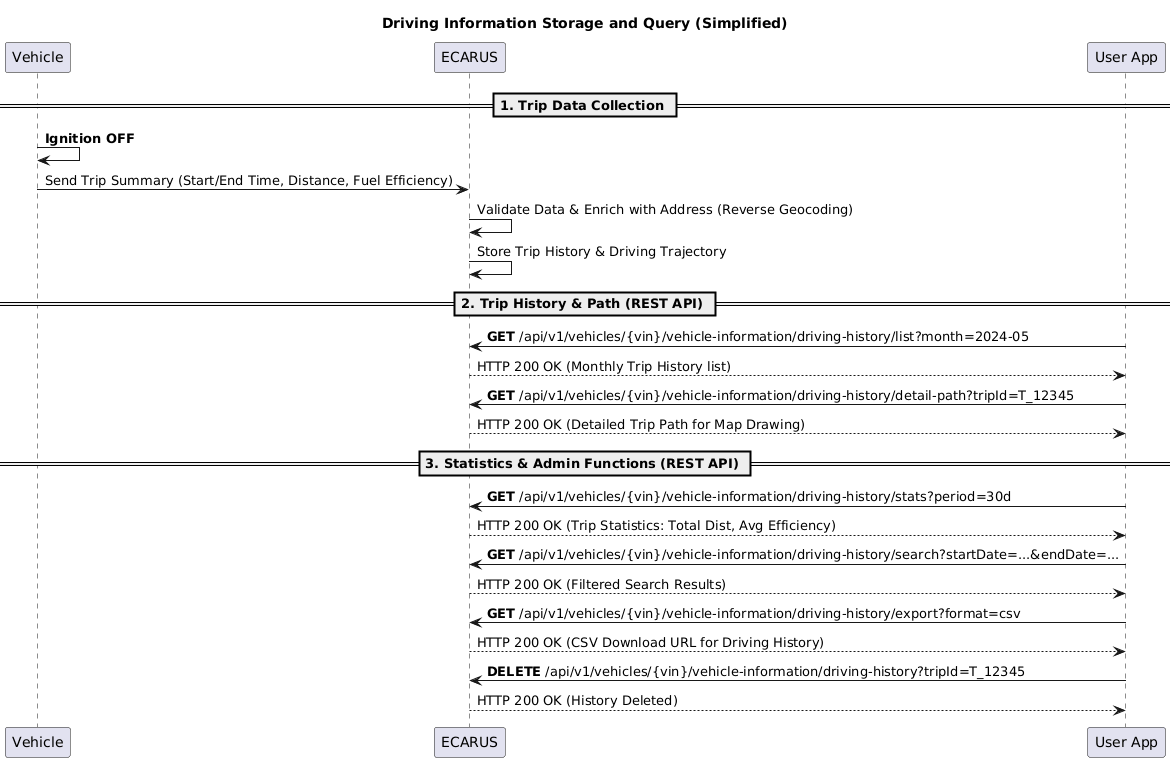
Sequence Diagram
Driving Information System Flow
API Endpoints
Refer to the Common API Specifications for headers, response codes, and error formats.
Refer to the Common API Specifications for headers, response codes, and error formats.
Recent Driving Query
curl -X GET "https://api.ecarus.run/api/v1/information/vehicles/KMHSH81C7LU123456/trips" \
-H "Authorization: Bearer sk_4f9c7b8e2d1a6c0f3e7a9b5d8c1e4f2a7c6d9e0b3f5a8c1d4e7f9b2c6a1e3d"Driving History List Query
curl -X GET "https://api.ecarus.run/api/v1/information/vehicles/KMHSH81C7LU123456/driving-history/list?month=2024-03" \
-H "Authorization: Bearer sk_4f9c7b8e2d1a6c0f3e7a9b5d8c1e4f2a7c6d9e0b3f5a8c1d4e7f9b2c6a1e3d"Driving Detailed Information and Route Query
curl -X GET "https://api.ecarus.run/api/v1/information/vehicles/KMHSH81C7LU123456/driving-history/detail-path?tripId=trip_001" \
-H "Authorization: Bearer sk_4f9c7b8e2d1a6c0f3e7a9b5d8c1e4f2a7c6d9e0b3f5a8c1d4e7f9b2c6a1e3d"Driving Statistics Query
curl -X GET "https://api.ecarus.run/api/v1/information/vehicles/KMHSH81C7LU123456/driving-history/stats?period=30d" \
-H "Authorization: Bearer sk_4f9c7b8e2d1a6c0f3e7a9b5d8c1e4f2a7c6d9e0b3f5a8c1d4e7f9b2c6a1e3d"Driving Search
curl -X GET "https://api.ecarus.run/api/v1/information/vehicles/KMHSH81C7LU123456/driving-history/search?from=2024-03-01&to=2024-03-31" \
-H "Authorization: Bearer sk_4f9c7b8e2d1a6c0f3e7a9b5d8c1e4f2a7c6d9e0b3f5a8c1d4e7f9b2c6a1e3d"Data Models
Trip List Response
{
  "vin": "KMHSH81C7LU123456",
  "trips": [
    {
      "tripId": "trip-12345",
      "startTime": "2026-01-13T08:30:00Z",
      "endTime": "2026-01-13T09:15:00Z",
      "date": "2026-01-13",
      "distance": 15.5,
      "duration": 45,
      "averageSpeed": 20.7,
      "maxSpeed": 65.2,
      "fuelConsumption": 1.2,
      "status": "COMPLETED",
      "eventCount": 2,
      "route": {
        "startLocation": { "latitude": 37.123, "longitude": 127.456 },
        "endLocation": { "latitude": 37.456, "longitude": 127.789 }
      }
    }
  ],
  "pagination": {
    "total": 1,
    "page": 1,
    "pageSize": 10,
    "hasNext": false,
    "hasPrev": false
  },
  "summary": {
    "totalDistance": 15.5,
    "totalDuration": 45,
    "averageSpeed": 20.7
  }
}Trip History List Response
{
  "month": "2024-03",
  "vin": "KMHSH81C7LU123456",
  "trips": [
    {
      "tripId": "trip-12345",
      "startTime": "2026-01-13T08:30:00Z",
      "endTime": "2026-01-13T09:15:00Z",
      "date": "2026-01-13",
      "distance": 15.5,
      "duration": 45,
      "averageSpeed": 20.7,
      "maxSpeed": 65.2,
      "fuelConsumption": 1.2,
      "eventCount": 2,
      "status": "COMPLETED"
    }
  ],
  "summary": {
    "totalTrips": 25,
    "totalDistance": 450.5,
    "totalDuration": 1200,
    "averageSpeed": 22.5,
    "averageFuelConsumption": 12.9,
    "fuelEfficiency": {
      "average": 12.9,
      "best": 15.2,
      "worst": 10.1,
      "trend": "IMPROVING"
    },
    "drivingPatterns": {
      "averageDailyDistance": 15.0,
      "averageTripDuration": 48.0,
      "peakHours": ["08:00-09:00", "18:00-19:00"]
    }
  },
  "generatedAt": "2026-01-13T14:30:00Z"
}Trip Detailed Information and Route Response
{
  "tripId": "trip-12345",
  "vin": "KMHSH81C7LU123456",
  "startTime": "2026-01-13T08:30:00Z",
  "endTime": "2026-01-13T09:15:00Z",
  "date": "2026-01-13",
  "distance": 15.5,
  "duration": 45,
  "averageSpeed": 20.7,
  "maxSpeed": 65.2,
  "fuelConsumption": 1.2,
  "status": "COMPLETED",
  "eventCount": 2,
  "route": {
    "startLocation": {
      "latitude": 37.123,
      "longitude": 127.456,
      "address": "123 Teheran-ro, Gangnam-gu, Seoul",
      "timestamp": "2026-01-13T08:30:00Z"
    },
    "endLocation": {
      "latitude": 37.456,
      "longitude": 127.789,
      "address": "456 Seocho-daero, Seocho-gu, Seoul",
      "timestamp": "2026-01-13T09:15:00Z"
    },
    "path": [
      {
        "latitude": 37.123,
        "longitude": 127.456,
        "timestamp": "2026-01-13T08:30:00Z",
        "speed": 0.0
      },
      {
        "latitude": 37.234,
        "longitude": 127.567,
        "timestamp": "2026-01-13T08:45:00Z",
        "speed": 45.5
      }
    ],
    "totalWaypoints": 120,
    "pathAccuracy": "HIGH"
  },
  "events": [
    {
      "eventId": "evt-001",
      "eventType": "HARD_BRAKE",
      "timestamp": "2026-01-13T08:45:12Z",
      "location": {
        "latitude": 37.234,
        "longitude": 127.567
      },
      "severity": "MEDIUM",
      "value": -0.45,
      "threshold": -0.4,
      "speed": 45.5,
      "roadType": "CITY"
    }
  ],
  "drivingAnalysis": {
    "highwayRatio": 0.3,
    "cityRatio": 0.7,
    "nightDrivingRatio": 0.1,
    "idleTime": 180,
    "ecoDrivingScore": 85
  },
  "generatedAt": "2026-01-13T14:30:00Z"
}Trip Statistics Response
{
  "period": "30d",
  "vin": "KMHSH81C7LU123456",
  "statistics": {
    "totalTrips": 25,
    "totalDistance": 450.5,
    "totalDuration": 1200,
    "averageSpeed": 22.5,
    "averageFuelConsumption": 12.9,
    "fuelEfficiency": {
      "average": 12.9,
      "best": 15.2,
      "worst": 10.1,
      "trend": "IMPROVING",
      "totalFuelUsed": 34.9
    },
    "drivingPatterns": {
      "averageDailyDistance": 15.0,
      "averageTripDuration": 48.0,
      "peakHours": ["08:00-09:00", "18:00-19:00"],
      "mostActiveDay": "Friday",
      "leastActiveDay": "Sunday"
    },
    "roadTypes": {
      "highway": {
        "distance": 135.2,
        "ratio": 0.3,
        "averageSpeed": 65.5
      },
      "city": {
        "distance": 315.3,
        "ratio": 0.7,
        "averageSpeed": 18.2
      }
    },
    "eventSummary": {
      "hardAcceleration": {
        "count": 12,
        "frequency": "0.4 per trip",
        "trend": "DECREASING"
      },
      "hardBrake": {
        "count": 8,
        "frequency": "0.27 per trip",
        "trend": "STABLE"
      },
      "sharpCornering": {
        "count": 5,
        "frequency": "0.17 per trip",
        "trend": "DECREASING"
      },
      "speeding": {
        "count": 3,
        "frequency": "0.1 per trip",
        "trend": "STABLE"
      }
    },
    "timeAnalysis": {
      "daytimeTrips": 20,
      "nightTrips": 5,
      "weekendTrips": 8,
      "weekdayTrips": 17,
      "averageTripStartTime": "09:30"
    }
  },
  "comparisons": {
    "previousPeriod": {
      "distanceChange": "+5.2%",
      "fuelEfficiencyChange": "+2.1%",
      "eventCountChange": "-12.5%"
    }
  },
  "generatedAt": "2026-01-13T14:30:00Z"
}Trip Search Response
{
  "from": "2024-03-01",
  "to": "2024-03-31",
  "vin": "KMHSH81C7LU123456",
  "trips": [
    {
      "tripId": "trip-12345",
      "startTime": "2026-01-13T08:30:00Z",
      "endTime": "2026-01-13T09:15:00Z",
      "date": "2026-01-13",
      "distance": 15.5,
      "duration": 45,
      "averageSpeed": 20.7,
      "maxSpeed": 65.2,
      "fuelConsumption": 1.2,
      "eventCount": 2,
      "status": "COMPLETED"
    }
  ],
  "pagination": {
    "total": 1,
    "page": 1,
    "pageSize": 20,
    "hasNext": false,
    "hasPrev": false
  },
  "filters": {
    "dateRange": {
      "from": "2024-03-01",
      "to": "2024-03-31"
    },
    "minDistance": null,
    "maxDistance": null,
    "eventTypes": [],
    "roadTypes": null,
    "timeRange": null
  },
  "summary": {
    "totalDistance": 15.5,
    "totalDuration": 45,
    "averageSpeed": 20.7,
    "totalFuelConsumption": 1.2,
    "totalEvents": 2
  },
  "generatedAt": "2026-01-13T14:30:00Z"
}Security and Privacy
Authentication and Authorization
- User authentication token required (JWT/OAuth2)
- Vehicle access permission verification
- Driving data collection consent verification
Data Security
- All API communication encrypted with HTTPS/TLS
- Security measures when transmitting real-time data
- Location information stored only on server
Privacy Protection
- Explicit consent for driving data collection
- Specify data collection purpose
- Compliance with data retention period policy
- Guarantee right to data deletion upon user request
Access Control
- VIN-based vehicle access permission verification
- Manage user-specific driving data access permissions
- Detect abnormal access patterns
Exception Handling
Network Related
- Connection Failure: Support offline mode, local data storage
- Slow Response: Loading indicator, timeout handling
- Server Down: Display error message, suggest retry
Sensor Related
- Sensor Error: Sensor error notification, display default values
- Data Inaccuracy: Low data reliability notification
- GPS Error: Location information error handling
Data Processing Related
- Large Volume Processing: Performance degradation notification when collecting large volume data
- Storage Space Shortage: Storage space shortage notification for data storage
- Analysis Error: Data analysis failure notification
Test Setup
Base URL: https://api.ecarus.run/api/v1/information
Authentication Token: sk_4f9c7b8e2d1a6c0f3e7a9b5d8c1e4f2a7c6d9e0b3f5a8c1d4e7f9b2c6a1e3d
Sample VIN: KMHSH81C7LU123456
Use Swagger UI for interactive API testing.
Deployment Considerations
App Store Registration
- Request real-time data collection permissions
- Request location information collection permissions
- Clear description of background data collection
Legal Regulation Compliance
- Compliance with personal information protection laws
- Mandatory driving data collection consent
- Compliance with data retention period policies
- Specify purpose of location information collection
Vehicle Compatibility
- Support various vehicle models
- Consider data processing differences by sensor type
- Reflect OEM-specific driving data format differences