
Remote Location Check API Developer Guide
Service Overview
Remote Location Check (Find My Car) is a telematics feature that allows users to easily find their vehicle location in environments like wide parking lots or large shopping mall parking lots by remotely operating the vehicle's horn and hazard lamps.
Service Features
- Easy vehicle location identification with remote horn and hazard lamp operation
- Various modes provided (horn only, hazard lamps only, simultaneous operation)
- Fast response based on one-way command
- Safety policy that only operates in parking state
- Rate Limit application to prevent abuse
Legal Requirements
- Compliance with vehicle horn sound related regulations
- Compliance with usage time limits in public places
- Compliance with personal information protection laws
- Abuse prevention policy application
Key Scenarios
Scenario 1: Remote Location Check Request and Execution
API Flow by Entity:
📱 App (User):
- Location Request: Request remote location check
- Command Reception: Receive 202 Accepted response
- Push Notification: Receive location check result push notification
- Map Display: Display received location information on map
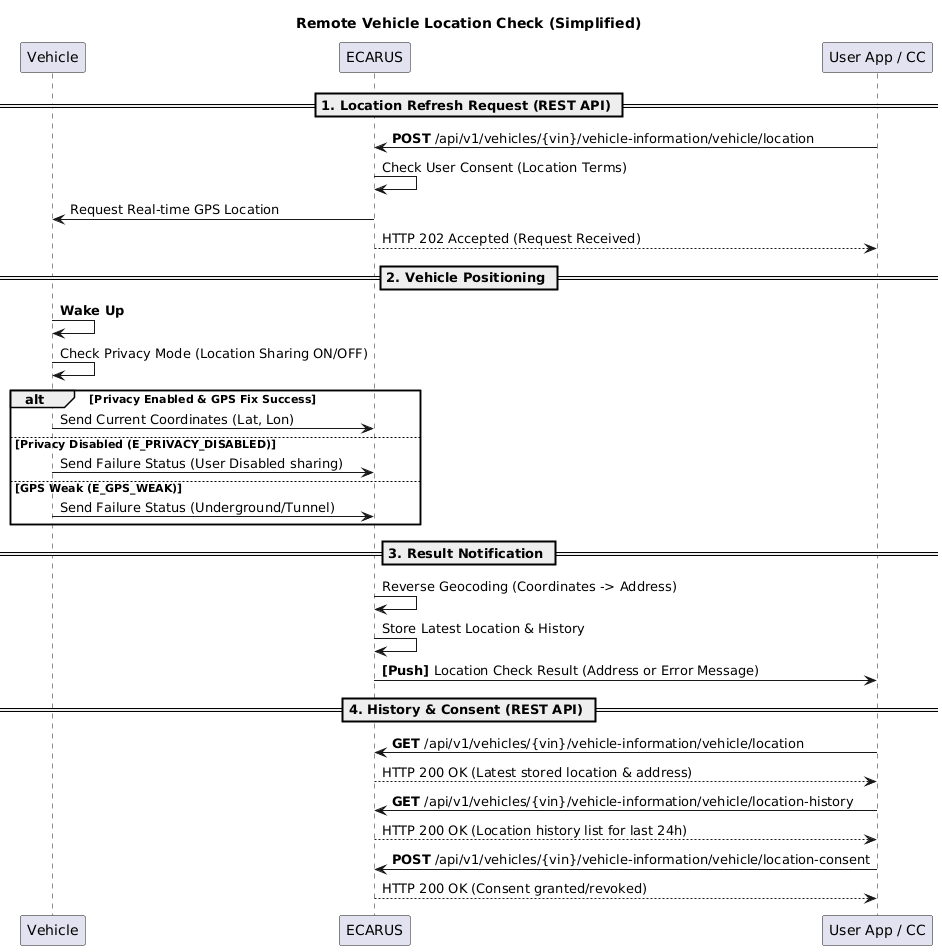
🚗 Vehicle (TCU):
- Command Reception: Receive location check command from ECARUS
- Privacy Mode Check: Check GPS sharing setting status
- GPS Reception: Receive GPS satellite signals and calculate location
- Result Publication: Publish success/failure results to ECARUS
🏢 Call Center:
- Proxy Request: Request location check on behalf of customer
- Status Check: Check location service status
- Result Reception: Receive location check results
Scenario 2: Location Check Failure and Exception Handling
API Flow by Entity:
📱 App (User):
- Command Request: Location check command request
- Failure Notification: Receive failure reasons via push notification
- Status Check: Check current location service status
- Settings Check: Check privacy settings
🚗 Vehicle (TCU):
- Privacy Mode Check: Check location sharing disabled status
- GPS Status Check: Check GPS module status and signal strength
- Failure Processing: Process failure when privacy mode or weak GPS signal
- Result Publication: Publish failure results and error codes
🏢 Call Center:
- History Query: Query failure history
- Consent Check: Check location consent status
- Customer Support: Analyze failure causes and guide customers
Scenario 3: Location Consent Management and Privacy Protection
API Flow by Entity:
📱 App (User):
- Consent Request: Consent to location information collection
- Consent Check: Check consent status
- Consent Withdrawal: Withdraw location consent
- Settings Management: Manage consent duration and purpose
🚗 Vehicle (TCU):
- Consent Check: Check location information collection consent status
- Data Collection: Collect location data within consented scope
- Secure Transmission: Transmit encrypted location data
- Privacy Protection: Comply with privacy protection policy
🏢 Call Center:
- Consent Management: Check consent status
- History Management: Manage location history
- Analysis Query: Query location analysis
- Privacy Protection: Process location information privacy protection
Scenario 4: Location Status Monitoring and History Management
API Flow by Entity:
📱 App (User):
- Latest Location Query: Query latest location information
- Status Query: Check location service status
- Real-time Monitoring: Real-time location monitoring via SSE stream
- History Check: Check location history
🚗 Vehicle (TCU):
- Status Collection: Real-time collection of GPS status, signal strength
- Location Transmission: Periodic location data transmission
- Event Publication: Publish location change events
- Status Report: Report current location service status
🏢 Call Center:
- Status Monitoring: Real-time location service status check
- History Query: Query location history
- Analysis Management: Manage location analysis
- Consent Management: Manage customer consent status
Key Features
📱 Features to Implement in App
1. Remote Location Check Function
- Location Request: Request remote location check
- Latest Location Query: Query latest location information
- Status Query: Check location service status
2. Location Consent Management Function
- Consent Request: Consent to location information collection
- Consent Check: Check consent status
- Consent Withdrawal: Withdraw location consent
3. Real-time Monitoring Function
- Real-time Updates: Real-time location monitoring via SSE stream
- Event Processing: Real-time processing of location change events
- Map Display: Visualize received location information on map
4. Notification and UI Functions
- Push Notifications: Receive location check result push notifications
- Map Display: Visualize location information on map
- Error Guidance: User-friendly error messages on failure
🏢 Features to Implement in Call Center
1. Proxy Location Check Function
- Proxy Location Request: Request location check on behalf of customer
- Status Check: Check location service status
2. History and Analysis Management Function
- History Query: Query location history
- Analysis Query: Query location analysis
- Statistics Generation: Generate driving statistics and visit pattern analysis
3. Consent Management Function
- Consent Check: Check customer consent status
- Privacy Protection: Process location information privacy protection
- Consent History: Manage consent/withdrawal history
4. Customer Support Function
- Problem Solving: Analyze location check failure causes
- Settings Support: Support customer location settings
- Security Monitoring: Monitor abnormal access patterns
🚗 Functions Processed by Vehicle (TCU)
1. Location Check Function
- GPS Reception: Receive GPS satellite signals and calculate location
- Privacy Check: Check location sharing setting status
- Result Publication: Publish location check results
2. Status Management Function
- GPS Status Monitoring: Monitor GPS module status and signal strength
- Location Data Collection: Periodic location data collection
- Event Publication: Publish location change events
3. Privacy Protection Function
- Consent Status Check: Check location information collection consent status
- Data Protection: Comply with privacy protection policy
- Secure Transmission: Transmit encrypted location data
Sequence Diagram
Remote Location Check System Flow
API Endpoints
Refer to the Common API Specifications for headers, response codes, and error formats.
Location Request
curl -X POST "https://api.ecarus.run/api/v1/remotecontrol/vehicles/KMHSH81C7LU123456/location" \
     -H "Authorization: Bearer sk_4f9c7b8e2d1a6c0f3e7a9b5d8c1e4f2a7c6d9e0b3f5a8c1d4e7f9b2c6a1e3d" \
     -H "Content-Type: application/json" \
-d '{"accuracy": "HIGH", "timeout": 10}'Location Status Query
curl -X GET "https://api.ecarus.run/api/v1/remotecontrol/vehicles/KMHSH81C7LU123456/location/status" \
-H "Authorization: Bearer sk_4f9c7b8e2d1a6c0f3e7a9b5d8c1e4f2a7c6d9e0b3f5a8c1d4e7f9b2c6a1e3d"Latest Location Query
curl -X GET "https://api.ecarus.run/api/v1/remotecontrol/vehicles/KMHSH81C7LU123456/location?includeAddress=true&includeSpeed=true" \
-H "Authorization: Bearer sk_4f9c7b8e2d1a6c0f3e7a9b5d8c1e4f2a7c6d9e0b3f5a8c1d4e7f9b2c6a1e3d"Location History Query
curl -X GET "https://api.ecarus.run/api/v1/remotecontrol/vehicles/KMHSH81C7LU123456/location/history?period=24h&limit=100&includeAddress=true" \
-H "Authorization: Bearer sk_4f9c7b8e2d1a6c0f3e7a9b5d8c1e4f2a7c6d9e0b3f5a8c1d4e7f9b2c6a1e3d"Location Consent Grant
curl -X POST "https://api.ecarus.run/api/v1/remotecontrol/vehicles/KMHSH81C7LU123456/location/consent" \
     -H "Authorization: Bearer sk_4f9c7b8e2d1a6c0f3e7a9b5d8c1e4f2a7c6d9e0b3f5a8c1d4e7f9b2c6a1e3d" \
     -H "Content-Type: application/json" \
-d '{"consent": true, "expiresAt": "2024-12-31T23:59:59Z", "purpose": "Vehicle location tracking for security and convenience", "dataRetention": 90}'Location Consent Withdrawal
curl -X DELETE "https://api.ecarus.run/api/v1/remotecontrol/vehicles/KMHSH81C7LU123456/location/consent" \
     -H "Authorization: Bearer sk_4f9c7b8e2d1a6c0f3e7a9b5d8c1e4f2a7c6d9e0b3f5a8c1d4e7f9b2c6a1e3d" \
     -H "Content-Type: application/json" \
-d '{"reason": "User privacy concern", "immediate": true}'Location Consent Status Check
curl -X GET "https://api.ecarus.run/api/v1/remotecontrol/vehicles/KMHSH81C7LU123456/location/consent" \
-H "Authorization: Bearer sk_4f9c7b8e2d1a6c0f3e7a9b5d8c1e4f2a7c6d9e0b3f5a8c1d4e7f9b2c6a1e3d"Location Analysis Query
curl -X GET "https://api.ecarus.run/api/v1/remotecontrol/vehicles/KMHSH81C7LU123456/location/analytics?period=30d&type=all" \
-H "Authorization: Bearer sk_4f9c7b8e2d1a6c0f3e7a9b5d8c1e4f2a7c6d9e0b3f5a8c1d4e7f9b2c6a1e3d"Location Real-time Update Stream (SSE)
Note: Recommended to access via browser or use a dedicated SSE client
curl -X GET "https://api.ecarus.run/api/v1/remotecontrol/vehicles/KMHSH81C7LU123456/location/updates/stream" \
     -H "Authorization: Bearer sk_4f9c7b8e2d1a6c0f3e7a9b5d8c1e4f2a7c6d9e0b3f5a8c1d4e7f9b2c6a1e3d" \
-H "Accept: text/event-stream"Data Models
Location Request
{
  "accuracy": "HIGH",
  "timeout": 10
}accuracy: LOW, MEDIUM, HIGH
timeout: Request timeout (seconds, maximum 60)
Location Status Response
{
  "vin": "KMHSH81C7LU123456",
  "isOnline": true,
  "lastUpdate": "2026-01-12T14:30:00Z",
  "locationEnabled": true,
  "gpsSignalStrength": "STRONG",
  "lastLocation": {
    "latitude": 37.5665,
    "longitude": 126.9780,
    "timestamp": "2026-01-12T14:30:00Z"
  },
  "timestamp": "2026-01-12T14:30:00Z"
}gpsSignalStrength: NONE, WEAK, MODERATE, STRONG
Location Response
{
  "vin": "KMHSH81C7LU123456",
  "location": {
    "latitude": 37.5665,
    "longitude": 126.9780,
    "accuracy": 5.2,
    "altitude": 15.8,
    "heading": 0.0,
    "address": "Seoul, Jung-gu, Sejong-daero 110",
    "timestamp": "2026-01-12T14:30:00Z"
  },
  "vehicleStatus": {
    "speed": 0,
    "ignitionStatus": "OFF",
    "gearPosition": "P"
  },
  "timestamp": "2026-01-12T14:30:00Z"
}Location History Request (Query Parameters)
period: 24h
limit: 100
offset: 0
includeAddress: true
includeSpeed: trueperiod: 1h, 24h, 7d, 30d
Location History Response
{
  "vin": "KMHSH81C7LU123456",
  "history": [
    {
      "latitude": 37.5665,
      "longitude": 126.9780,
      "accuracy": 5.2,
      "altitude": 15.8,
      "address": "Seoul, Jung-gu, Sejong-daero 110",
      "speed": 0,
      "heading": 0.0,
      "ignitionStatus": "OFF",
      "timestamp": "2026-01-12T14:30:00Z"
    }
  ],
  "total": 1,
  "hasMore": false
}Location Consent Request
{
  "consent": true,
  "expiresAt": "2024-12-31T23:59:59Z",
  "purpose": "Vehicle location tracking for security and convenience",
  "dataRetention": 90,
  "scope": ["tracking", "analytics", "emergency"]
}scope: tracking, analytics, emergency, sharing
dataRetention: Data retention period (days)
Location Consent Response
{
  "vin": "KMHSH81C7LU123456",
  "consent": true,
  "grantedAt": "2026-01-12T14:30:00Z",
  "expiresAt": "2024-12-31T23:59:59Z",
  "purpose": "Vehicle location tracking for security and convenience",
  "dataRetention": 90,
  "scope": ["tracking", "analytics", "emergency"],
  "lastAccess": "2026-01-12T14:30:00Z",
  "accessCount": 15
}Location Analysis Request (Query Parameters)
period: 30d
type: all
includeDetails: trueperiod: 7d, 30d, 90d, 1y
type: all, driving, parking, routes
Location Analysis Response
{
  "vin": "KMHSH81C7LU123456",
  "period": "30d",
  "analytics": {
    "totalDistance": 1250.5,
    "averageSpeed": 45.2,
    "maxSpeed": 125.8,
    "parkingTime": 480,
    "drivingTime": 320,
    "idleTime": 65,
    "fuelConsumed": 85.2,
    "mostVisitedLocations": [
      {
        "address": "Seoul, Jung-gu, Sejong-daero 110",
        "visitCount": 15,
        "totalDuration": 240,
        "coordinates": {
          "latitude": 37.5665,
          "longitude": 126.9780
        }
      }
    ],
    "routes": [
      {
        "from": "Seoul, Jung-gu",
        "to": "Seoul, Gangnam-gu",
        "frequency": 8,
        "averageDuration": 25
      }
    ]
  },
  "timestamp": "2026-01-12T14:30:00Z"
}Location Status Update (SSE)
{
  "type": "LOCATION_UPDATE",
  "vin": "KMHSH81C7LU123456",
  "timestamp": "2026-01-12T14:30:00Z",
  "data": {
    "latitude": 37.5665,
    "longitude": 126.9780,
    "accuracy": 5.2,
    "altitude": 15.8,
    "speed": 0,
    "heading": 0.0,
    "ignitionStatus": "OFF",
    "changeType": "LOCATION_UPDATE"
  }
}type: LOCATION_UPDATE, GEOFENCE_ENTER, GEOFENCE_EXIT, SPEED_ALERT
changeType: LOCATION_UPDATE, IGNITION_ON, IGNITION_OFF, MOVEMENT_START, MOVEMENT_STOP
Security and Privacy
Authentication and Authorization
- User authentication token required (JWT/OAuth2)
- Vehicle access permission verification
- Location check function permission verification
Data Security
- All API communication encrypted with HTTPS/TLS
- Command Signing to prevent command forgery
- MQTT ACL-based VIN access control
Privacy Protection
- Explicit consent for vehicle status information collection
- Specify purpose of location information collection
- Compliance with command execution history retention period policy
Access Control
- VIN-based vehicle access permission verification
- Command Rate Limit application
- Abnormal access pattern detection
- Abuse prevention policy
Exception Handling
Network Related
- Connection Failure: Support offline mode, cache last status
- Slow Response: Loading indicator, timeout handling
- Server Down: Display error message, suggest retry
Vehicle Status Related
- Vehicle Offline: Notify command transmission failure
- During Driving: Notify function limitations, display guidance message
- Low Battery: Notify execution limitations
Command Execution Related
- Failure: Clearly display failure reasons
- Timeout: Notify Command TTL expiration
- Partial Success: Detailed guidance when only some functions operate
Regulation Related
- Time Limit: Guide usage time limits in public places
- Noise Regulation: Guide horn usage time limits
- Local Laws: Guide compliance with country-specific regulations
Test Setup
Base URL: https://api.ecarus.run/api/v1/remotecontrol
Authentication Token: sk_4f9c7b8e2d1a6c0f3e7a9b5d8c1e4f2a7c6d9e0b3f5a8c1d4e7f9b2c6a1e3d
Sample VIN: KMHSH81C7LU123456
Use Swagger UI for interactive API testing.
Deployment Considerations
App Store Registration
- Request vehicle control permissions
- Clear description of location information collection
- Guide public place usage precautions
Legal Regulation Compliance
- Compliance with personal information protection laws
- Check vehicle horn sound related regulations
- Compliance with public place noise regulations
- Check country-specific vehicle control laws
Vehicle Compatibility
- Support various vehicle models
- Consider OEM-specific horn/hazard lamp control method differences
- Reflect country-specific regulation differences