
Vehicle Information Sharing (V2V C-ITS) Developer Guide
Service Overview
V2V (Vehicle-to-Vehicle) communication is a vehicle communication technology that supports traffic safety and autonomous driving functions by exchanging information directly between vehicles or through network-based communication.
Service Features
- Real-time information sharing between vehicles
- Accident prevention and hazard warnings
- Cooperative driving support for autonomous vehicles
- Low-latency communication requirements
- Future vehicle communication technology
Legal Requirements
- Compliance with Personal Information Protection Act
- Vehicle identifier anonymization required
- Compliance with national C-ITS regulations
- Security certificate-based communication
Key Scenarios
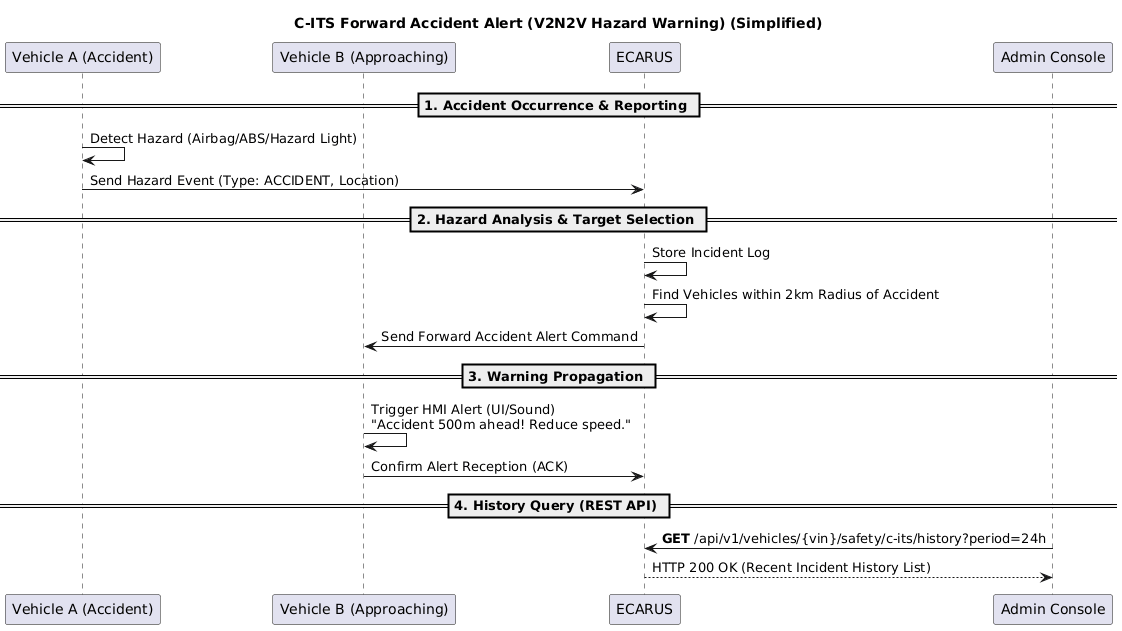
Scenario 1: Accident Detection and Hazard Data Transmission
API Flow by Entity:
🚗 Vehicle (TCU):
- Hazard Detection: Automatic accident detection through airbag, ABS, hazard light detection
- Data Transmission: Transmit accident location and status information
- Status Update: Transmit emergency service arrival status
- Hazard Clear: Transmit accident clear status
🏢 Call Center:
- Accident Reception: Receive vehicle accident data
- Hazard Storage: Store accident information and geo-indexing
- Nearby Vehicle Search: Search for vehicles within 2km radius
- Emergency Service Coordination: Automatic dispatch request for ambulance, police, fire department
Scenario 2: Hazard Warning Propagation to Nearby Vehicles
API Flow by Entity:
🚗 Vehicle (TCU):
- Warning Command Reception: Receive hazard warning command from server
- Warning Display: Display "Accident ahead (500m ahead)" warning on vehicle display
- Push Notification: Send "Accident occurred 500m ahead. Please be careful." notification to user app
- Warning Clear: Clear warning when hazard clear command received
🏢 Call Center:
- Target Vehicle Selection: Automatic selection of vehicles within accident radius
- Warning Command Transmission: Transmit hazard warning command
- Warning Clear: Transmit hazard clear command
Scenario 3: Emergency Service Coordination and Status Updates
API Flow by Entity:
🏢 Call Center:
- Emergency Alert Creation: Automatic creation of accident emergency alert
- Emergency Service Dispatch: Automatic dispatch instructions for ambulance, police, fire department
- Emergency Alert Transmission: Send "Accident occurred. Emergency services are en route." notification to user
- Status Update: Update status when emergency services arrive on scene
📱 App (User):
- Emergency Alert Reception: Receive emergency service dispatch notification
- Status Update Reception: Receive "Emergency services have arrived on scene." update
Scenario 4: C-ITS System Monitoring
API Flow by Entity:
🏢 Call Center:
- System Status Query: Query C-ITS system status
- Accident History Query: Query active accident history
- System Configuration: Update system configuration
- Real-time Monitoring: 24-hour C-ITS system status monitoring
Scenario 5: Real-time C-ITS Event Stream
API Flow by Entity:
📱 App (User):
- SSE Connection: Connect to real-time C-ITS event stream
- Real-time Reception: Receive hazard warning events in real-time
- Hazard Display: Real-time display of "Accident hazard 500m ahead"
🏢 Call Center:
- Stream Provision: Provide real-time C-ITS event stream
- Event Transmission: Transmit hazard warning events in real-time
Scenario 6: Mass Accident Emergency Broadcast
API Flow by Entity:
🏢 Call Center:
- Mass Accident Detection: Automatic detection of mass accident
- Emergency Broadcast Start: Start system-wide emergency broadcast
- Broadcast Message Transmission: Transmit "Mass accident occurred - Please refrain from driving in this area" message
🚗 Vehicle (TCU):
- Emergency Broadcast Reception: Receive system emergency broadcast
- Emergency Alert Display: Display "🚨 Emergency Broadcast: Please refrain from driving in this area." alert
Key Features
🚗 Features to Implement in Vehicle
1. Hazard Detection and Transmission
- Hazard Detection: Automatic detection of airbag, ABS, hazard lights
- Accident Data Transmission: Transmit accident location and status
- Status Update: Update emergency service status
- Hazard Clear: Transmit accident clear status
2. Hazard Warning Reception and Display
- Warning Command Reception: Receive hazard warning command from server
- Warning Display: Display hazard warning on vehicle display
- Warning Clear: Receive and process hazard clear command
- Hazard Distance Display: Display distance information to accident
3. Emergency Broadcast Reception
- Emergency Broadcast Reception: Receive system emergency broadcast
- Emergency Alert Display: Display emergency broadcast content on vehicle
- Area Information: Display relevant area information
🏢 Features to Implement in Call Center
1. Accident Data Management
- Accident Reception: Receive vehicle accident data
- Hazard Storage: Store accident information and geo-indexing
- Nearby Vehicle Search: Radius-based vehicle search
- Accident Status Management: Manage status from accident occurrence to clearance
2. Hazard Warning Propagation System
- Target Vehicle Selection: Automatic selection of vehicles within accident radius
- Warning Command Transmission: Transmit hazard warning command
- Warning Clear: Transmit hazard clear command
- Propagation Optimization: Optimize hazard information propagation range and timing
3. Emergency Service Coordination
- Emergency Alert Creation: Automatic creation of accident emergency alert
- Emergency Service Dispatch: Automatic dispatch instructions for ambulance, police, fire department
- Emergency Alert Transmission: Send emergency service status notifications to user
- Status Tracking: Track status until emergency services arrive on scene
4. C-ITS System Management
- System Status Query: Query C-ITS system status
- Accident History Query: Query active accident history
- System Configuration: Update system configuration
- 24-hour Monitoring: Continuous C-ITS system status monitoring
5. Real-time Event Stream
- Stream Provision: Provide real-time C-ITS event stream
- Event Transmission: Transmit hazard warning events in real-time
- Connection Management: Manage SSE connection status
- Stream Optimization: Optimize mass event processing
6. Emergency Broadcast System
- Mass Accident Detection: Automatic detection of mass accident
- Emergency Broadcast Start: Start system-wide emergency broadcast
- Broadcast Message Transmission: Transmit emergency broadcast message to all vehicles
- Broadcast Control: Control broadcast start and end
7. API Service Management
- API Response Processing: Process C-ITS related API requests
- Data Provision: Provide C-ITS data to clients
- Performance Monitoring: Monitor API response time and availability
- Error Handling: Handle API errors and exception situations
8. Geo-indexing and Spatial Search
- Geo-indexing: Geo-indexing of accident location information
- Radius Search: Radius-based vehicle search
- Spatial Query Optimization: Optimize large-scale vehicle search
- Hazard Area Management: Set and manage hazard areas
9. Data Analysis and Statistics
- Accident Pattern Analysis: Automatic analysis of accident occurrence patterns
- Hazard Statistics: Automatic generation of hazard situation occurrence statistics
- Service Quality Analysis: Automatic analysis of C-ITS service quality
- Improvement Recommendations: Automatic generation of service improvement recommendations
Sequence Diagram
V2V C-ITS Communication System Flow
API Endpoints
Refer to the Common API Specifications for headers, response codes, and error formats.
Refer to the Common API Specifications for headers, response codes, and error formats.
C-ITS Incident History Query
curl -X GET "https://api.ecarus.run/api/v1/information/vehicles/KMHSH81C7LU123456/c-its/history?limit=10" \
-H "Authorization: Bearer sk_4f9c7b8e2d1a6c0f3e7a9b5d8c1e4f2a7c6d9e0b3f5a8c1d4e7f9b2c6a1e3d"C-ITS Analytics Query
curl -X GET "https://api.ecarus.run/api/v1/information/vehicles/KMHSH81C7LU123456/c-its/analytics?period=30d" \
-H "Authorization: Bearer sk_4f9c7b8e2d1a6c0f3e7a9b5d8c1e4f2a7c6d9e0b3f5a8c1d4e7f9b2c6a1e3d"C-ITS Configuration Update
curl -X PUT "https://api.ecarus.run/api/v1/information/vehicles/KMHSH81C7LU123456/c-its/config" \
     -H "Authorization: Bearer sk_4f9c7b8e2d1a6c0f3e7a9b5d8c1e4f2a7c6d9e0b3f5a8c1d4e7f9b2c6a1e3d" \
     -H "Content-Type: application/json" \
-d '{"alertEnabled": true, "notificationTypes": ["HAZARD", "ACCIDENT"]}'Real-time Events Stream (SSE)
curl -X GET "https://api.ecarus.run/api/v1/information/vehicles/KMHSH81C7LU123456/c-its/events" \
     -H "Authorization: Bearer sk_4f9c7b8e2d1a6c0f3e7a9b5d8c1e4f2a7c6d9e0b3f5a8c1d4e7f9b2c6a1e3d" \
-H "Accept: text/event-stream"Data Models
C-ITS History Query Response
{
  "vin": "KMHSH81C7LU123456",
  "userId": "user123",
  "period": "30d",
  "limit": 10,
  "offset": 0,
  "history": [
    {
      "eventId": "event-001",
      "eventType": "EMERGENCY_BRAKE_WARNING",
      "timestamp": "2026-01-13T10:15:23Z",
      "position": {
        "lat": 37.4021,
        "lon": 127.1087
      },
      "severity": "HIGH",
      "vehicleId": "pseudonym-12345",
      "affectedVehicles": 3,
      "message": "Sudden braking occurred",
      "processed": true,
      "actionTaken": "ALERT_DISPLAYED"
    },
    {
      "eventId": "event-002",
      "eventType": "ROAD_HAZARD",
      "timestamp": "2026-01-13T09:45:12Z",
      "position": {
        "lat": 37.4015,
        "lon": 127.1092
      },
      "severity": "MEDIUM",
      "vehicleId": "pseudonym-67890",
      "affectedVehicles": 5,
      "message": "Road pothole detected",
      "processed": true,
      "actionTaken": "HAZARD_MAPPED"
    }
  ],
  "total": 45,
  "hasMore": true,
  "nextOffset": 10
}C-ITS Analysis Response
{
  "vin": "KMHSH81C7LU123456",
  "userId": "user123",
  "period": "30d",
  "analysis": {
    "communication": {
      "totalMessages": 1250,
      "messagesSent": 620,
      "messagesReceived": 630,
      "averageLatency": 45,
      "successRate": 98.5,
      "peakUsageHours": ["08:00-09:00", "17:00-18:00"]
    },
    "events": {
      "totalEvents": 45,
      "emergencyEvents": 3,
      "hazardEvents": 12,
      "warningEvents": 30,
      "averageResponseTime": 2.3,
      "falsePositiveRate": 2.1
    },
    "network": {
      "directV2VUsage": 65.2,
      "networkAssistedUsage": 34.8,
      "averageSignalStrength": 78.5,
      "connectionUptime": 99.2,
      "handoverEvents": 23
    },
    "safety": {
      "accidentsAvoided": 2,
      "nearMissesReduced": 8,
      "brakeWarningsPrevented": 15,
      "safetyScore": 87.3,
      "improvementTrend": "POSITIVE"
    }
  },
  "insights": [
    {
      "type": "COMMUNICATION_PATTERN",
      "message": "Direct V2V communication is optimal during peak hours",
      "confidence": 0.92,
      "recommendation": "Maintain current communication settings"
    },
    {
      "type": "SAFETY_IMPROVEMENT",
      "message": "Emergency response time has improved by 15% this month",
      "confidence": 0.88,
      "recommendation": "Continue current safety protocols"
    }
  ],
  "generatedAt": "2026-01-13T14:30:00Z"
}C-ITS Configuration Update Response
{
  "vin": "KMHSH81C7LU123456",
  "userId": "user123",
  "status": "UPDATED",
  "timestamp": "2026-01-13T14:35:00Z",
  "message": "C-ITS configuration updated successfully",
  "updatedConfig": {
    "alerts": {
      "alertEnabled": true,
      "notificationTypes": ["HAZARD", "ACCIDENT", "EMERGENCY_BRAKE"],
      "previousNotificationTypes": ["HAZARD", "ACCIDENT"],
      "severityThreshold": "MEDIUM"
    },
    "communication": {
      "preferredMode": "HYBRID",
      "directV2VPriority": true,
      "networkAssistedFallback": true,
      "maxLatency": 100
    },
    "privacy": {
      "pseudonymRotationInterval": "PT2H",
      "locationSharingEnabled": true,
      "dataRetentionPeriod": "P30D"
    },
    "safety": {
      "automaticEmergencyBrakingAlerts": true,
      "collisionWarningSensitivity": "HIGH",
      "roadHazardDetection": true
    }
  },
  "validation": {
    "isValid": true,
    "warnings": [
      "High collision warning sensitivity may increase false positives"
    ],
    "errors": []
  },
  "effectiveDate": "2026-01-13T14:35:00Z",
  "nextReviewDate": "2026-02-13T14:35:00Z"
}Data Processing Architecture
Communication Structure Types
- Direct V2V: Direct communication between vehicles (DSRC/C-V2X)
- Network-assisted: Server-based communication (V2N)
- Hybrid: Combined structure of both methods
Data Types
- CAM/BSM: Location and driving information
- DENM: Hazard event information
- Real-time data transmission requirements
Core Technical Elements
- Digital Twin: Real-time management of vehicle locations
- Spatial Search: Radius-based vehicle search
- Low Latency: Tens to hundreds of ms latency requirements
Security Policy
- V2X PKI-based authentication
- Vehicle identifier anonymization
- Compliance with national C-ITS security frameworks
Security and Privacy
Vehicle Identifier Protection
- Use of Pseudonym Certificate
- Periodic identifier changes
- Location information anonymization
Communication Security
- V2X PKI-based authentication
- Message integrity guarantee
- Compliance with national security frameworks
Privacy Protection
- Compliance with Personal Information Protection Act
- Vehicle identifier anonymization required
- Location information protection
- Compliance with data retention policies
Exception Handling
Communication Related
- Connection Failure: Switch to Direct V2V
- Slow Response: Use Network-assisted mode
- Communication Quality Degradation: Adaptive message transmission
Security Related
- Authentication Failure: Request new Pseudonym
- Certificate Expiration: Handle automatic renewal
- Security Threat: Communication interruption and reporting
Vehicle Status Related
- No GPS Signal: Use last location information
- Sensor Error: Replace with default values
- Vehicle OFF: Deactivate V2V communication
Test Setup
Base URL: https://api.ecarus.run/api/v1/information
Authentication Token: sk_4f9c7b8e2d1a6c0f3e7a9b5d8c1e4f2a7c6d9e0b3f5a8c1d4e7f9b2c6a1e3d
Sample VIN: KMHSH81C7LU123456
Use Swagger UI for interactive API testing.
Deployment Considerations
Development Priorities
- Lower priority development item
- Consider infrastructure and vehicle support availability
- Requires phased implementation
Technical Readiness
- Target commercialization in 2027
- Related infrastructure construction required
- Vehicle communication module installation required
Legal Regulation Compliance
- Compliance with Personal Information Protection Act
- Vehicle identifier anonymization required
- Compliance with national C-ITS regulations
- Security certificate-based communication
Vehicle Compatibility
- Support for C-V2X or DSRC communication modules
- V2X PKI certificate storage space
- Computing performance capable of real-time processing
- Low-latency communication interface