
Vehicle Status Check API Developer Guide
Service Overview
The Remote Vehicle Status service is a telematics service that allows users to remotely query their vehicle's current status information through mobile apps or web platforms.
Service Features
- Real-time remote vehicle status query
- Read-only service without vehicle control functions
- User convenience-focused status checking
- Vehicle usage planning support
- Improved vehicle management efficiency
Legal Requirements
- Compliance with Personal Information Protection Act
- Explicit consent required for vehicle status information collection
- Separate consent required for location information
- Compliance with data retention policies
Key Scenarios
Scenario 1: Vehicle Status Update Request and Processing
API Flow by Entity:
📱 App (User):
- Refresh Request: Request latest vehicle status update
- Dashboard Query: Query entire vehicle status for display
- Location Check: Check current vehicle location
- Usage Monitoring: Monitor usage and fuel levels and Query fuel status
Scenario 2: Direct Vehicle Status Query
API Flow by Entity:
📱 App (User):
- Status Query: Query entire vehicle status
- Dashboard Display: Display comprehensive vehicle status dashboard
🏢 Call Center:
- Status Provision: Provide latest vehicle status to app
- History Query: Query status change history for analysis
- Event Streaming: Provide real-time status updates via SSE
Scenario 3: Component-specific Detailed Status Query
API Flow by Entity:
📱 App (User):
- Vehicle Location Query: Query vehicle location
- Fuel Status Query: Query fuel/battery status
- Odometer Query: Query odometer reading
🏢 Call Center:
- Component-specific Status Provision: Provide detailed status for each component
- Component-specific Analysis: Analyze component-specific status and generate warnings
Scenario 4: Status History Query and Analysis
API Flow by Entity:
📱 App (User):
- History Query: Query status change history
- Trend Chart Display: Display status change trend charts
🏢 Call Center:
- History Management: Automatic management of status change history
- Pattern Analysis: Analyze status change patterns
- Statistics Generation: Automatic generation of status-related statistics
Scenario 5: Status Alert Configuration and Management
API Flow by Entity:
📱 App (User):
- Alert Configuration Query: Query alert configuration
- Alert Configuration Update: Update alert configuration
🏢 Call Center:
- Configuration Management: Automatic management of alert configuration
- Threshold Management: Manage threshold values for each component
- Alert Transmission: Automatic transmission of configured alerts
Scenario 6: Real-time Status Event Reception
API Flow by Entity:
📱 App (User):
- SSE Connection: Connect to real-time status event stream
- Real-time Reception: Receive vehicle status changes in real-time
🏢 Call Center:
- Event Stream Provision: Provide real-time status event stream
- Event Transmission: Transmit status change events in real-time
Scenario 7: Status Analysis and Statistics
API Flow by Entity:
📱 App (User):
- Analysis Query: Query status analysis data
🏢 Call Center:
- Status Analysis: Analyze average engine temperature, battery health trends, etc.
- Statistics Provision: Provide status-related statistical data
- Maintenance Score: Calculate vehicle maintenance score
Scenario 8: Emergency Situation Response
API Flow by Entity:
🏢 Call Center:
- Emergency Alert Generation: Generate alert when emergency situations like engine overheating detected
- Emergency Contact: Make emergency phone contact with user
- Tow Truck Dispatch: Request tow truck dispatch in emergency situations
📱 App (User):
- Emergency Alert Reception: Receive "Engine overheating detected. Please stop at a safe location immediately." alert
Key Features
📱 Features to Implement in App
1. Vehicle Status Query and Monitoring
- Overall Status: Query entire vehicle status
- Vehicle Location: Query current vehicle location
- Fuel Status: Check fuel or battery level
- Odometer Query: Check vehicle mileage
- Status Refresh: Request vehicle status update
- Alert Monitoring: Check active status alerts
2. Status History and Analysis
3. Status History and Analytics
- History Query: Query past status change history
- SSE Stream: Connect to real-time status update stream
5. Status Analysis Query
- Analysis Data Query: Query status analysis data
- Maintenance Score: Check vehicle maintenance score
- Efficiency Analysis: Check vehicle efficiency-related analysis information
🏢 Features to Implement in Call Center
1. Vehicle Status Data Collection System
- Data Reception: Receive vehicle status data in real-time
- Data Storage: Secure storage of status data
- Status Management: Automatic management of latest status
- Quality Management: Manage status data quality and accuracy
- Data Validation: Validate status data validity
2. Status History Management System
- History Collection: Automatic collection of status change history
- History Management: Automatic management of status history
- Pattern Analysis: Automatic analysis of status change patterns
- Statistics Generation: Automatic generation of status-related statistics
3. Alert and Warning System
- Alert Configuration Management: Automatic management of alert configuration
- Threshold Management: Automatic management of threshold values for each component
- Alert Generation: Automatic generation of alerts when status abnormalities detected
- Push Notifications: Automatic sending of push notifications to user app
- Emergency Alerts: Immediate alerts for emergency situations
4. Status Analysis System
- Status Analysis: Automatic execution of status analysis
- Statistics Generation: Automatic generation of status-related statistics
- Maintenance Score: Automatic calculation of vehicle maintenance score
- Efficiency Analysis: Automatic analysis of vehicle efficiency
5. API Service Management
- API Response Processing: Process vehicle status related API requests
- Request Validation: Validate API requests
- Performance Monitoring: Monitor API response time and availability
- Error Handling: Handle API errors and exception situations
- Version Management: Manage API versions and compatibility
6. Security and Privacy
- Status Collection Consent: Manage consent for vehicle status data collection
- Privacy Protection: Protect user vehicle status information privacy
- Data Security: Secure processing of vehicle status data
- Audit Logging: Maintain audit logs for status information access and processing
- Access Control: Manage user-specific status information access permissions
7. System Operations and Monitoring
- System Status Monitoring: 24-hour monitoring of vehicle status system
- Data Quality Management: Manage status data quality and accuracy
- Sensor Status Monitoring: Monitor vehicle sensor communication status
- Exception Handling: Handle network, sensor, data processing exceptions
- System Optimization: Optimize status data processing logic
8. Data Analysis and Statistics
- Status Pattern Analysis: Automatic analysis of vehicle status change patterns
- Usage Statistics: Automatic generation of status query usage statistics
- Failure Statistics: Automatic generation of vehicle failure-related statistics
- Service Quality Analysis: Automatic analysis of status service quality
- Improvement Recommendations: Automatic generation of service improvement recommendations
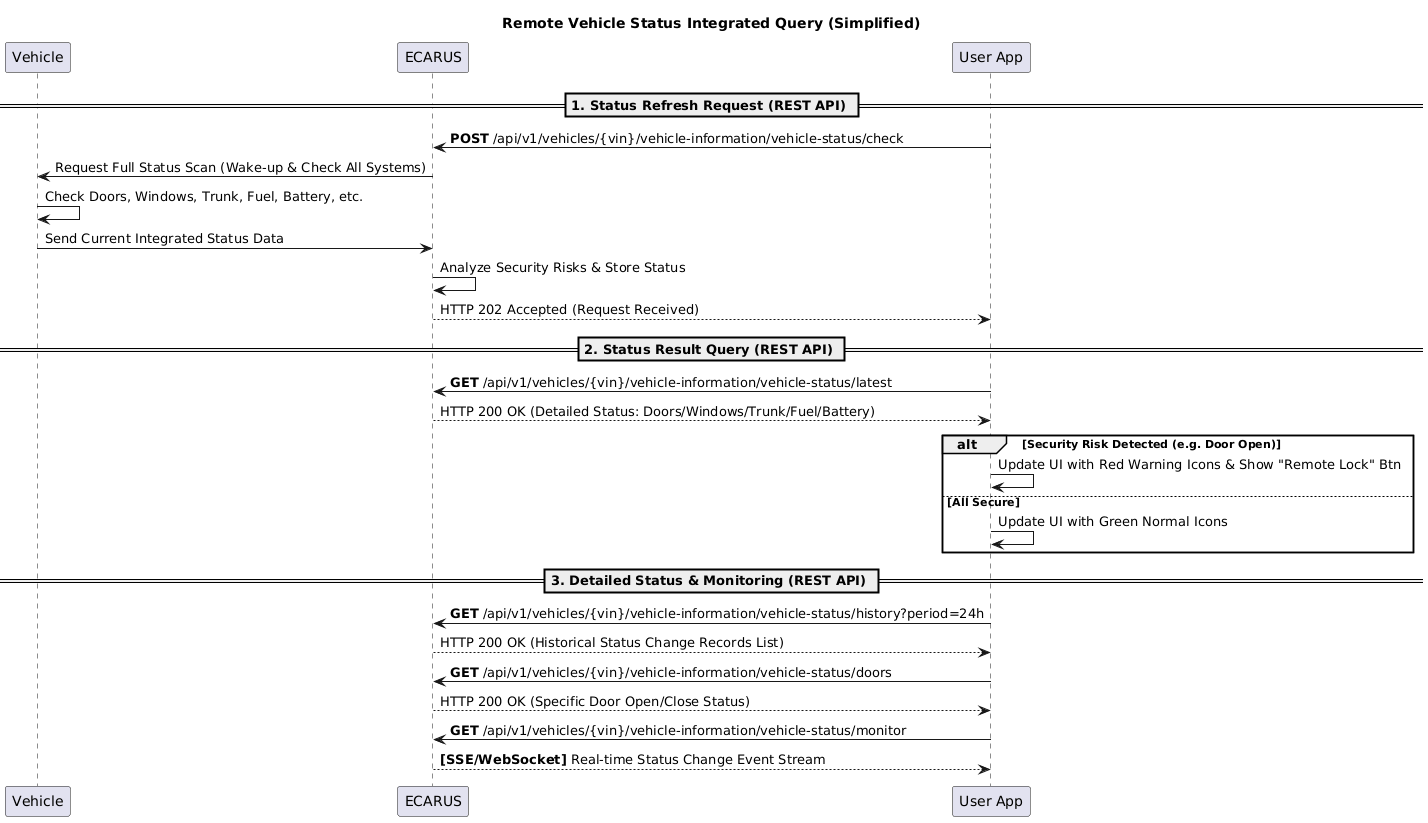
Sequence Diagram
Vehicle Status System Flow
API Endpoints
Refer to the Common API Specifications for headers, response codes, and error formats.
Current Vehicle Status Query
curl -X GET "https://api.ecarus.run/api/v1/information/vehicles/KMHSH81C7LU123456/status" \
-H "Authorization: Bearer sk_4f9c7b8e2d1a6c0f3e7a9b5d8c1e4f2a7c6d9e0b3f5a8c1d4e7f9b2c6a1e3d"Vehicle Location Query
curl -X GET "https://api.ecarus.run/api/v1/information/vehicles/KMHSH81C7LU123456/location" \
-H "Authorization: Bearer sk_4f9c7b8e2d1a6c0f3e7a9b5d8c1e4f2a7c6d9e0b3f5a8c1d4e7f9b2c6a1e3d"Fuel Status Query
curl -X GET "https://api.ecarus.run/api/v1/information/vehicles/KMHSH81C7LU123456/fuel" \
-H "Authorization: Bearer sk_4f9c7b8e2d1a6c0f3e7a9b5d8c1e4f2a7c6d9e0b3f5a8c1d4e7f9b2c6a1e3d"Odometer Query
curl -X GET "https://api.ecarus.run/api/v1/information/vehicles/KMHSH81C7LU123456/odometer" \
-H "Authorization: Bearer sk_4f9c7b8e2d1a6c0f3e7a9b5d8c1e4f2a7c6d9e0b3f5a8c1d4e7f9b2c6a1e3d"Vehicle Status History Query
curl -X GET "https://api.ecarus.run/api/v1/information/vehicles/KMHSH81C7LU123456/status/history?limit=10" \
-H "Authorization: Bearer sk_4f9c7b8e2d1a6c0f3e7a9b5d8c1e4f2a7c6d9e0b3f5a8c1d4e7f9b2c6a1e3d"Vehicle Status Refresh Request
curl -X POST "https://api.ecarus.run/api/v1/information/vehicles/KMHSH81C7LU123456/status/refresh" \
-H "Authorization: Bearer sk_4f9c7b8e2d1a6c0f3e7a9b5d8c1e4f2a7c6d9e0b3f5a8c1d4e7f9b2c6a1e3d"Vehicle Status Alerts Query
curl -X GET "https://api.ecarus.run/api/v1/information/vehicles/KMHSH81C7LU123456/status/alerts" \
-H "Authorization: Bearer sk_4f9c7b8e2d1a6c0f3e7a9b5d8c1e4f2a7c6d9e0b3f5a8c1d4e7f9b2c6a1e3d"Data Models
Vehicle Status Information Response
{
  "vin": "KMHSH81C7LU123456",
  "userId": "user123",
  "timestamp": "2026-01-13T14:30:00Z",
  "status": {
    "ignition": "OFF",
    "engine": "STOPPED",
    "transmission": "PARK",
    "doors": {
      "driver": "CLOSED",
      "passenger": "CLOSED",
      "rearLeft": "CLOSED",
      "rearRight": "CLOSED",
      "trunk": "CLOSED"
    },
    "windows": {
      "driver": "CLOSED",
      "passenger": "CLOSED",
      "rearLeft": "CLOSED",
      "rearRight": "CLOSED"
    },
    "lights": {
      "headlights": "OFF",
      "parkingLights": "OFF",
      "brakeLights": "OFF",
      "turnSignals": {
        "left": "OFF",
        "right": "OFF"
      },
      "hazardLights": "OFF"
    },
    "security": {
      "immobilizer": "ACTIVE",
      "alarm": "DISARMED",
      "locked": true
    },
    "climate": {
      "airConditioning": "OFF",
      "heating": "OFF",
      "fanSpeed": 0,
      "temperature": 22.5,
      "unit": "CELSIUS"
    }
  },
  "location": {
    "latitude": 37.4021,
    "longitude": 127.1087,
    "altitude": 15.2,
    "accuracy": 5.0,
    "timestamp": "2026-01-13T14:30:00Z"
  },
  "fuel": {
    "level": 65.5,
    "range": 320,
    "unit": "PERCENTAGE",
    "type": "GASOLINE",
    "estimatedRefill": "2026-01-20T00:00:00Z"
  },
  "battery": {
    "level": 85.2,
    "voltage": 12.6,
    "health": "GOOD",
    "charging": false,
    "estimatedLife": 24,
    "unit": "PERCENTAGE"
  },
  "odometer": {
    "total": 48200,
    "trip": 125,
    "unit": "KILOMETERS",
    "lastReset": "2020-01-01T00:00:00Z"
  },
  "sensors": {
    "tirePressure": {
      "frontLeft": 32.5,
      "frontRight": 32.8,
      "rearLeft": 31.9,
      "rearRight": 32.2,
      "unit": "PSI",
      "status": "NORMAL"
    },
    "engineTemperature": 95.2,
    "coolantTemperature": 88.5,
    "oilPressure": 45.8,
    "unit": "CELSIUS"
  },
  "alerts": [
    {
      "alertId": "alert-001",
      "type": "LOW_FUEL",
      "severity": "MEDIUM",
      "message": "Fuel level is below 20%",
      "timestamp": "2026-01-13T14:30:00Z",
      "acknowledged": false
    }
  ]
}Vehicle Location Information Response
{
  "vin": "KMHSH81C7LU123456",
  "userId": "user123",
  "timestamp": "2026-01-13T14:30:00Z",
  "location": {
    "latitude": 37.4021,
    "longitude": 127.1087,
    "altitude": 15.2,
    "accuracy": 5.0,
    "heading": 185.5,
    "speed": 0,
    "unit": "KM/H"
  },
  "address": {
    "country": "South Korea",
    "city": "Seoul",
    "district": "Gangnam-gu",
    "street": "Teheran-ro",
    "building": "123",
    "postalCode": "06234"
  },
  "geofence": {
    "withinGeofence": true,
    "geofenceId": "home-001",
    "geofenceName": "Home",
    "distanceFromCenter": 150,
    "unit": "METERS"
  },
  "parking": {
    "isParked": true,
    "parkingDuration": 28500,
    "parkingType": "STREET",
    "parkingLocation": {
      "floor": "B2",
      "zone": "A-15",
      "coordinates": {
        "latitude": 37.4021,
        "longitude": 127.1087
      }
    }
  },
  "lastUpdate": "2026-01-13T14:30:00Z"
}Fuel/Battery Status Information Response
{
  "vin": "KMHSH81C7LU123456",
  "userId": "user123",
  "timestamp": "2026-01-13T14:30:00Z",
  "fuel": {
    "level": 65.5,
    "range": 320,
    "unit": "PERCENTAGE",
    "type": "GASOLINE",
    "capacity": 50,
    "currentVolume": 32.75,
    "volumeUnit": "LITERS",
    "consumption": {
      "average": 8.5,
      "current": 7.2,
      "unit": "L/100KM"
    },
    "estimatedRefill": {
      "date": "2026-01-20T00:00:00Z",
      "mileage": 50900,
      "remainingRange": 320
    },
    "lastRefill": {
      "date": "2026-01-10T00:00:00Z",
      "mileage": 47500,
      "volume": 45,
      "cost": 65000
    }
  },
  "battery": {
    "level": 85.2,
    "voltage": 12.6,
    "health": "GOOD",
    "charging": false,
    "estimatedLife": 24,
    "unit": "PERCENTAGE",
    "temperature": 25.5,
    "temperatureUnit": "CELSIUS",
    "capacity": 60,
    "currentCapacity": 51.12,
    "capacityUnit": "AH",
    "chargeCycles": 145,
    "lastCharge": {
      "date": "2026-01-13T08:00:00Z",
      "duration": 7200,
      "durationUnit": "SECONDS",
      "chargeLevel": 90.5
    },
    "estimatedReplacement": {
      "date": "2028-01-13T00:00:00Z",
      "mileage": 95000
    }
  },
  "alerts": [
    {
      "alertId": "alert-001",
      "type": "LOW_FUEL",
      "severity": "MEDIUM",
      "message": "Fuel level is below 20%",
      "threshold": 20,
      "currentValue": 65.5,
      "timestamp": "2026-01-13T14:30:00Z",
      "acknowledged": false
    },
    {
      "alertId": "alert-002",
      "type": "BATTERY_HEALTH",
      "severity": "LOW",
      "message": "Battery health is good but aging",
      "healthScore": 75,
      "timestamp": "2026-01-13T14:30:00Z",
      "acknowledged": true
    }
  ]
}Odometer Information Response
{
  "vin": "KMHSH81C7LU123456",
  "userId": "user123",
  "timestamp": "2026-01-13T14:30:00Z",
  "odometer": {
    "total": 48200,
    "trip": 125,
    "unit": "KILOMETERS",
    "lastReset": {
      "date": "2020-01-01T00:00:00Z",
      "mileage": 0
    },
    "daily": {
      "today": 125,
      "yesterday": 85,
      "average": 95
    },
    "weekly": {
      "thisWeek": 425,
      "lastWeek": 380,
      "average": 402
    },
    "monthly": {
      "thisMonth": 1850,
      "lastMonth": 1620,
      "average": 1735
    },
    "yearly": {
      "thisYear": 48200,
      "lastYear": 42500,
      "average": 45350
    }
  },
  "trip": {
    "currentTrip": {
      "id": "trip-001",
      "startTime": "2026-01-13T12:00:00Z",
      "startMileage": 48075,
      "duration": 9000,
      "durationUnit": "SECONDS",
      "distance": 125,
      "averageSpeed": 50,
      "maxSpeed": 85,
      "speedUnit": "KM/H",
      "fuelConsumed": 9.0,
      "fuelUnit": "LITERS",
      "efficiency": 7.2,
      "efficiencyUnit": "L/100KM"
    },
    "lastTrips": [
      {
        "id": "trip-000",
        "date": "2026-01-12T18:30:00Z",
        "distance": 85,
        "duration": 5400,
        "fuelConsumed": 6.8,
        "efficiency": 8.0
      }
    ]
  },
  "maintenance": {
    "nextService": {
      "type": "OIL_CHANGE",
      "dueMileage": 50000,
      "dueDate": "2026-02-10T00:00:00Z",
      "remainingMileage": 1800,
      "remainingDays": 25,
      "urgency": "MEDIUM"
    },
    "lastService": {
      "type": "OIL_CHANGE",
      "mileage": 45000,
      "date": "2025-06-15T00:00:00Z",
      "provider": "Official Service Center",
      "cost": 85000
    }
  },
  "alerts": [
    {
      "alertId": "alert-001",
      "type": "MILEAGE_MILESTONE",
      "severity": "INFO",
      "message": "Vehicle has reached 48,000 km milestone",
      "mileage": 48200,
      "timestamp": "2026-01-13T14:30:00Z",
      "acknowledged": false
    }
  ]
}Security and Privacy
Authentication and Authorization
- User authentication token required (JWT/OAuth2)
- Vehicle access permission verification
- Status query permission confirmation
Data Security
- All API communications encrypted with HTTPS/TLS
- Security measures for vehicle status data transmission
- Separate consent required for sensitive location information
Privacy Protection
- Explicit consent for vehicle status information collection
- Separate consent required for location information collection
- Compliance with data retention policies
- Right to data deletion upon user request
Access Control
- VIN-based vehicle access permission verification
- User-specific status information access permission management
- Detection of abnormal access patterns
Exception Handling
Network Related
- Connection Failure: Offline mode support, last status caching
- Slow Response: Loading indicator, timeout handling
- Server Down: Error message display, retry suggestion
Vehicle Status Related
- Vehicle OFF: Display last saved status
- Long-term Data Non-receipt: Data update required notification
- Sensor Error: Sensor error notification, default value display
On-demand Query Related
- Vehicle Wake-up Failure: Wake-up failure notification
- Response Timeout: Timeout handling
- Battery Consumption Concern: Battery consumption warning
Permission Related
- Authentication Failure: Re-authentication requirement
- Insufficient Permissions: Clear explanation of permission shortage
- Location Information Permission: Location information access permission shortage notification
Test Setup
Base URL: https://api.ecarus.run/api/v1/information
Authentication Token: sk_4f9c7b8e2d1a6c0f3e7a9b5d8c1e4f2a7c6d9e0b3f5a8c1d4e7f9b2c6a1e3d
Sample VIN: KMHSH81C7LU123456
Use Swagger UI for interactive API testing.
Deployment Considerations
App Store Registration
- Request vehicle status query permissions
- Request location information collection permissions (optional)
- Clear description of vehicle status monitoring
Legal Regulation Compliance
- Compliance with Personal Information Protection Act
- Explicit consent required for vehicle status information collection
- Separate consent required for location information
- Compliance with data retention policies
Vehicle Compatibility
- Support for various vehicle models
- Support for internal combustion/electric/hybrid vehicles
- Consideration of OEM-specific status information format differences
- Consideration of sensor type-specific data processing differences